myFawry App Payment Method Flow
Learn how your customers can complete payments using the myFawry mobile application through a seamless QR code-based checkout experience.
Introduction
The myFawry App payment method provides your customers with a quick and secure way to complete their payments using the myFawry mobile application. When a customer selects myFawry as their preferred payment method during checkout, the FawryPay checkout plugin automatically renders a unique QR code on the screen, enabling the customer to complete the payment with just a few taps on their mobile device.
This payment method is ideal for customers who already have the myFawry application installed and prefer a contactless, app-based payment experience.
How It Works
Once the customer selects myFawry as the preferred payment method, the checkout process transitions to a simple three-step flow:
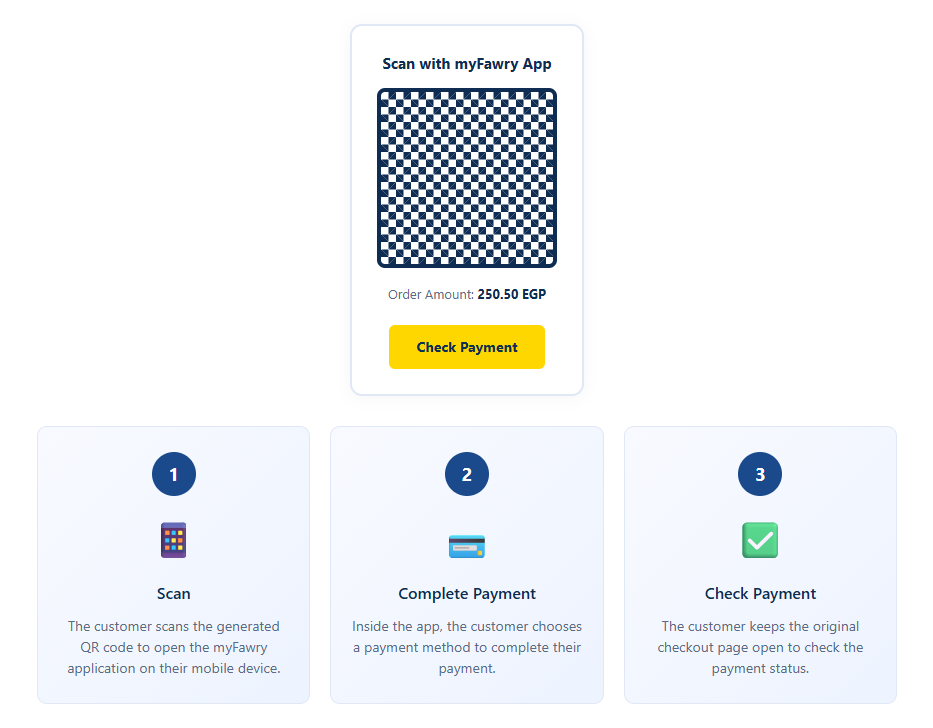
To verify the transaction, the customer clicks the Check Payment button displayed on the checkout screen. This action triggers a request to retrieve the current state of the order.
Enabling myFawry as the Only Payment Method CLIENT-SIDE
If the merchant wants to restrict the checkout to allow only myFawry as the payment method for a transaction, pass the paymentMethod key with the value MYFAWRY in your chargeRequest. This ensures that only the myFawry App payment option is displayed to the customer, regardless of the other payment methods enabled on the merchant's account.
Sample Charge Request:
                    function buildChargeRequest() {
                                const chargeRequest = {
                                                merchantCode: '1tSa6uxz2nRbgY+b+cZGyA==',
                                                merchantRefNum: '2312465464',
                                                customerMobile: '01xxxxxxxxx',
                                                customerEmail: 'email@domain.com',
                                                customerName: 'Customer Name',
                                                customerProfileId: '1212',
                                                paymentExpiry: '1631138400000',
                                                language: "en-gb",
                                                chargeItems: [
                                                        {
                                                            itemId: '6b5fdea340e31b3b0339d4d4ae5',
                                                            description: 'Product Description',
                                                            price: 50.00,
                                                            quantity: 2,
                                                            imageUrl: 'https://developer.fawrystaging.com/photos/45566.jpg',
                                                        },
                                                        {
                                                            itemId: '97092dd9e9c07888c7eef36',
                                                            description: 'Product Description',
                                                            price: 75.25,
                                                            quantity: 3,
                                                            imageUrl: 'https://developer.fawrystaging.com/photos/639855.jpg',
                                                        },
                                                ],
                                                paymentMethod: 'MYFAWRY',  // ← new supported value


                                                returnUrl: 'https://developer.fawrystaging.com',
                                                authCaptureModePayment: false,
                                                signature: "2ca4c078ab0d4c50ba90e31b3b0339d4d4ae5b32f97092dd9e9c07888c7eef36"
                                            };
                       return chargeRequest;
                    }
myFawry Payment Status Response
Upon clicking the Check Payment button, your application will receive a JSON response indicating the current status of the transaction and the exact timestamp.
Sample Response:
Response Parameters Description
| Arguments | type | Description | example |
|---|---|---|---|
| orderStatus | String | The current status of the order in the FawryPay system. Possible values: UNPAID, PAID, EXPIRED, CANCELED, REFUNDED. | UNPAID |
| paymentTime | Timestamp | The exact timestamp indicating when the payment status was last updated, formatted as ISO 8601 (yyyy-MM-ddTHH:mm:ss.SSS). | 2026-04-22T10:59:14.207 |
Best Practices
- Ensure your checkout page clearly instructs the customer not to close the browser tab until the payment is verified.
- Display a loading indicator when the Check Payment button is clicked to provide feedback during the status check.
- Implement a retry mechanism allowing customers to click the Check Payment button multiple times if the status has not yet been updated.
- Use the Server Notification V2 webhook in parallel to receive real-time updates on the backend when the payment is confirmed.